TL;DR: You can find and qualify leads on X without X's official API - which runs $100 to $42,000+ a month - by using a tool that reads your own already-logged-in browser session instead.
Most guides to X (Twitter) lead generation compare data-access methods on price alone. Fewer of them mention that several of the cheapest options ask for your account password or session cookies to work, which is the fastest way to get an X account locked - the opposite of what a sales pipeline needs.
What does X's official API actually cost?
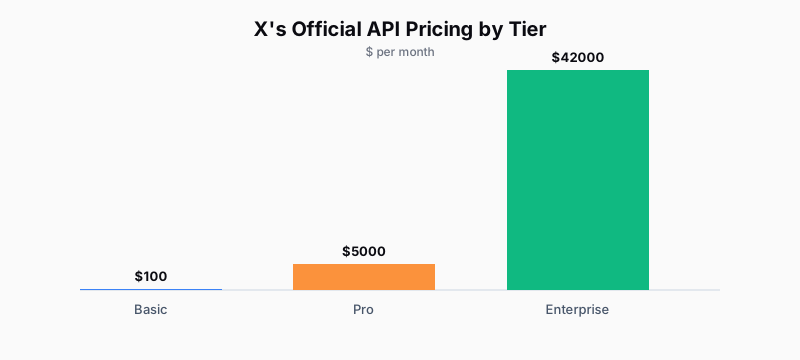
X prices API access in four tiers. The free tier allows roughly one request per 15 minutes, which is unusable for active prospecting. The Basic tier is $100/month for 10,000 tweets and a 7-day search window. The Pro tier costs $5,000/month for full-archive access. Enterprise pricing starts around $42,000/month for custom volume. For a solo seller or small team doing outbound on X, the Basic tier's 7-day lookback is often too short to research a lead's posting history, and Pro is priced for companies building products on top of X data, not for finding 20 prospects a week. There's also no tier priced for "I need to check one prospect's last few posts before I DM them" - every tier bills as if you're building a product on top of the data, not just reading it the way you'd read it manually in a browser tab.
That gap is why most of the workarounds below exist in the first place: the pricing model assumes commercial data resale, not a seller doing manual research at human scale.
How do people get around API pricing?
Sellers and growth teams typically land on one of three workarounds instead of paying X directly.
Third-party data APIs collect public X data themselves, then resell query access. They're commonly 10-100x cheaper than X's own pricing and skip the 7-day search limit, but they're a second vendor with its own reliability and data-freshness tradeoffs.
Scraping stacks - no-code combinations like a scraping actor plus an automation tool, or a Python library such as snscrape - pull data without any API key at all. They're free to run but come with real maintenance cost: X's frontend changes periodically break scrapers, and anti-bot measures can flag the scraping account.
Browser-extension tools run inside a browser tab you're already logged into and read only what's already rendered on the page - no API key, no separate login, no scraping infrastructure to maintain.
What's the real risk with data providers and scraping tools?
The workaround guides that compare these three options rarely flag the credential question. A number of "affordable X lead scraping" services ask for your X username and password, or your session cookie, so they can log in as you and pull your network's data. Handing that over means a third party can trigger X's automated abuse detection on your account - and you have no visibility into what they're doing with it while it's checked out.
The other gap in most of these guides: they stop at "here's how to collect a spreadsheet of profiles." A spreadsheet isn't a pipeline. Once you have 200 rows of usernames and bios, you still have to work out who's worth messaging, what to say to each one, and where every conversation stands a week later.
How do you find X leads without an API key, step by step?
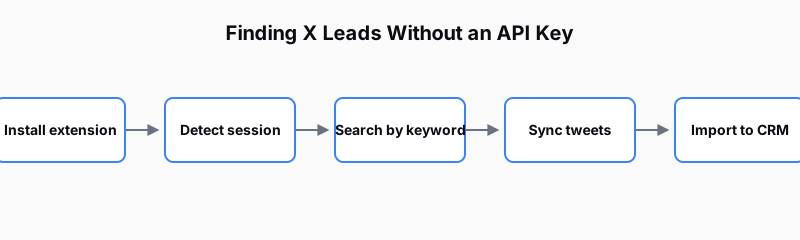
- Install a Chrome extension that scrapes X inside your own browser session rather than through a third-party login or an API key - this is the setup used by tools like Fairyx, which never asks for your X password.
- Search by keyword or niche instead of pulling a competitor's entire follower list - keyword search surfaces people actively posting about the problem you solve, which qualifies leads before you've spent any outreach time.
- Filter for engagement and bio signals (follower count, recent posting activity, role keywords in the bio) so the tool only imports profiles worth a human look.
- Sync each lead's recent tweets automatically so you're researching current context, not a stale snapshot from the day you imported them.
- Move imported leads into a CRM view with pipeline stages, instead of leaving them in a spreadsheet, so "who did I already contact" stops being a manual lookup.
How do you test this in 20 minutes?
- Install a browser-session-based X scraping extension and confirm it detects your logged-in session without asking for a password.
- Run one keyword search for your niche and check whether the results are people actively discussing the problem, not just anyone with the keyword in their bio.
- Import 5-10 of the highest-signal profiles into a CRM view rather than a spreadsheet.
- Check that each imported lead's recent tweets synced automatically.
- Confirm the tool enforces a daily send cap before you connect any outreach step - this is what keeps the account from getting flagged once you start messaging.
FAQ
Does X's official API have a usable free tier for lead generation?
No. The free tier allows about one request per 15 minutes, which is too slow for active prospecting. The cheapest usable tier, Basic, is $100/month with only a 7-day search window.
Is it against X's terms of service to scrape profile data?
X's terms restrict automated scraping outside its own API. Tools that read data inside your own logged-in browser session (rather than scraping at scale from an external server) carry a different risk profile than headless scraping bots, but you should review X's current developer terms before relying on any third-party tool.
Do browser-extension lead tools require my X password?
It depends on the tool. Some ask for your username and password to log in on your behalf; others, including Fairyx, detect your already-active browser session and never see or store your password.
What's the cheapest way to collect X leads at scale?
No-code scraping stacks and third-party data APIs are typically the lowest cost per lead, but both add either engineering maintenance or a second vendor relationship. Browser-session tools trade some scale for zero API cost and no credential-sharing risk.
How many leads can I safely import and message per day?
This varies by tool, but a common safe default is capping automated write actions - comments and DMs - well below X's own rate limits, with a minimum delay between each send, to avoid triggering account flags.